myAudi
- 4.8
- Rating
- 1.00M
- Installs
- Free
- Price

 Analysis by App-foxy
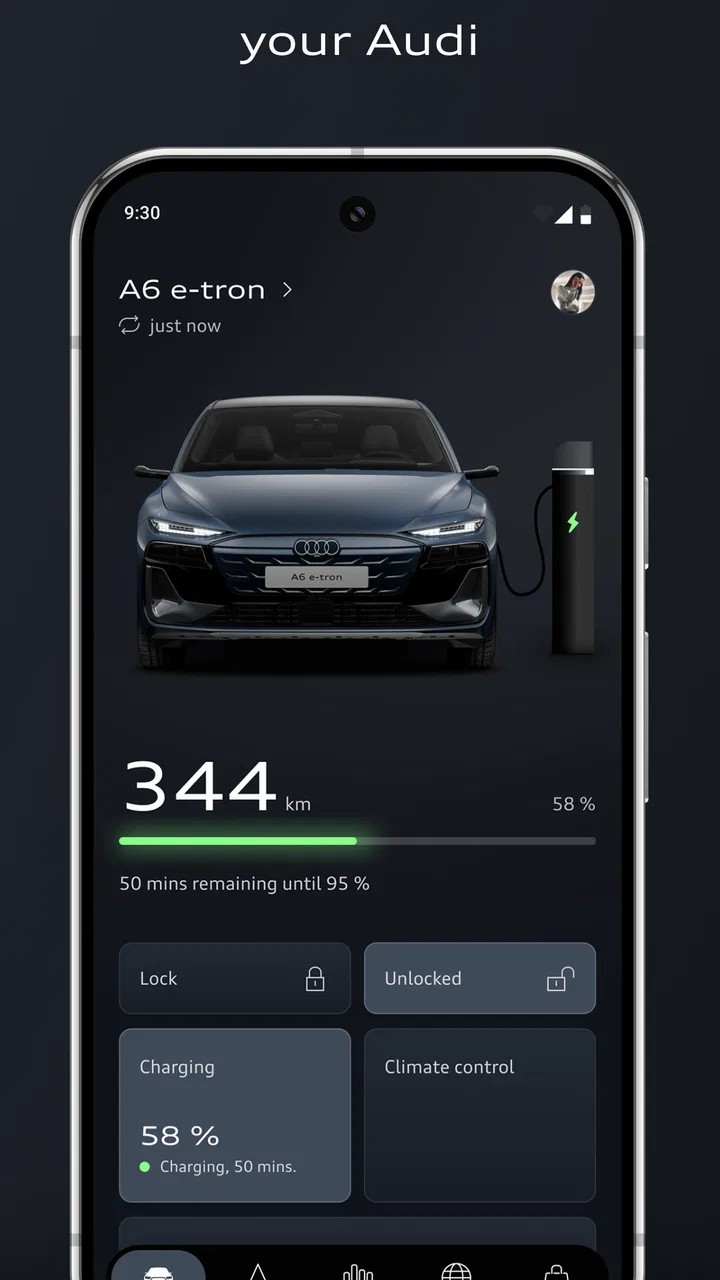
If you drive an Audi and want one place to keep an eye on the relationship between your car and the manufacturer’s connected services, myAudi is the app I would try first. It is a free Auto & Vehicles app from Audi, built for Audi drivers rather than for general car ownership. That distinction matters: its value depends less on how many tools it offers in the abstract and more on whether your vehicle and Audi account can make those tools useful in daily life.
I approached it as a decision rather than a simple download recommendation. A companion app can be convenient, but it can also become another account, another notification source, and another screen to check. In my experience, myAudi makes the most sense when you already own an Audi that supports the relevant Audi connect services. If you are only looking for navigation, fuel prices, maintenance reminders, or a generic parking tool, a specialized alternative may be simpler. If you want Audi-specific information and connected ownership features in one official place, the choice is much clearer.
What I would check before relying on myAudi
The first question is not whether the app is attractive or free. It is whether it fits your exact Audi. The app is designed around Audi vehicles, accounts, and connected services, so the experience can vary according to the car, equipment, market, and services associated with it. I would install it with realistic expectations: the app is a companion to the vehicle, not a universal replacement for every function already built into the dashboard.
You May Also Like

 Blood Strike: 2.5 Anniversary
Blood Strike’s Loadouts Turn Every Drop Into a Tactical Gamble
A close look at Blood Strike’s custom loadouts: how fast access to signature weapons reshapes its battle royale rhythm, rewards preparation, and narrows the gap between fights.

 Pandora - Music & Podcasts
Pandora’s Music Is Easy to Start, but Harder to Recover
Pandora’s strength is its low-effort path from a seed to a station. Its weak spot is how much confidence it asks you to place in connection, setup, and quiet recovery.

 8 Ball Pool
 Is Built on Rivalries, Rematches, and Routine
A close look at the rivalries, rematches, shared routines, and unanswered safety questions that turn a quick pool match into a persistent mobile community.

 Samsung Music
’s Quiet Strength Is Playing What You Already Own
Its reach comes less from spectacle than from dependable access to a personal library. That simplicity is both the app’s strongest retention engine and its ceiling.

 AccuWeather: Weather Radar
AccuWeather Review: A Quick, Clear Forecast for Everyday Decisions
For everyday plans, the best forecast is the one you can understand quickly. AccuWeather makes rain timing, radar, and local conditions easy to act on, with a few trade-offs.

 Hill Climb Racing
Why Hill Climb Racing Still Turns Crashes Into One More Run
A tiny car, a bumpy hill and one more upgrade: Hill Climb Racing keeps resurfacing because its simple chaos makes every near-miss feel personal.
More From Our News Desk
View All News


That is also why I would not judge it solely by the presence of a familiar feature name. A service can be visible in the app yet still depend on vehicle compatibility or account setup. Before changing how you manage your car, I would add the vehicle carefully, complete the sign-in process, and check which connected options actually appear for that car. This small check prevents a common disappointment: assuming that every Audi driver receives the same controls.
The app is free to download, and its content rating is Everyone, which makes it approachable for a broad audience. It requires a relatively modern mobile operating system, with minimum support beginning at version twelve. That is worth checking before you plan a setup session on an older phone. The current release is version 5.2.1, so keeping the app updated is sensible when the app is being used alongside vehicle-connected services.
Its scale gives some useful context. myAudi has passed one million installs and holds an average rating of 3.9 from roughly eighty-three thousand ratings, with about one thousand nine hundred written reviews. I read that as a sign of a widely used but not universally effortless experience. A score around this level usually suggests that usefulness depends heavily on the car and the user’s expectations, rather than indicating a product that is either consistently excellent or broadly unusable.
The account and vehicle setup deserve patience
The most important early workflow is getting the vehicle and account relationship right. I would avoid trying to rush through setup while standing beside the car in a busy parking area. Have the relevant vehicle information available, use the same account consistently, and take a moment to confirm that the car shown in the app is the one you intend to manage. When a connected-car app feels unreliable, the cause is often an incomplete setup or a mismatch between accounts rather than the main screen itself.
I would also treat the first successful connection as a test, not as proof that everything is ready. Open the vehicle area, review the available Audi connect services, and check whether the information looks current. If something seems delayed, I would wait and refresh rather than repeatedly tapping the same control. Connected services involve communication between the phone, Audi’s systems, and the vehicle, so an action may not feel as immediate as a normal offline app command.
That delay is a practical trade-off. A generic notes app can record that you parked somewhere instantly, while myAudi is useful because it is connected to your Audi ownership context. The official connection is the reason to choose it, but it is also the reason not to expect every screen to behave like a simple calculator or checklist.
Use it as an ownership dashboard, not just a remote-control screen
One of the better ways to judge myAudi is to look beyond the most obvious connected action. I found more value in treating it as a place to organize the ownership relationship: checking what Audi connect services are available, reviewing vehicle-related information, and using the app as a starting point before a journey. That broader view makes it less disappointing when a particular action is unavailable for a specific car.
For example, imagine leaving work on a cold or rainy evening. Instead of walking to the car immediately, you can open myAudi and check the vehicle-related information available to your account before leaving the building. The practical benefit is not that the app eliminates every step; it is that it gives you a quick digital checkpoint. If the information is current and the relevant connected service is available, you can make a better decision about when to head outside.
On another day, the same app may be more useful as a preparation tool. Before a longer drive, I would open it while I still have time to verify the vehicle context and connected services. This is a better habit than waiting until I am already seated behind the wheel. It reduces distraction and makes the phone app part of the pre-drive routine rather than something I keep reaching for during the journey.
The strongest use case is quiet preparation before driving, not constant interaction while driving. That distinction is easy to miss. The app can support ownership, but safe driving still comes first. I would never use a phone-based vehicle feature while moving if it requires attention that belongs on the road.
Where the official Audi connection helps
The clearest advantage is specificity. A general vehicle app may help you track expenses, store service notes, or remember where you parked, but it does not have the same natural relationship with an Audi account and Audi connect services. With myAudi, I do not have to recreate the identity of the car manually every time I want to check something. That makes the app more relevant for owners who want a manufacturer-centered view of their vehicle.
This is particularly useful for people who prefer one official place rather than a collection of unrelated tools. I would rather begin with a service that already understands the Audi context than combine a generic car log, a separate reminder app, and another tool for vehicle information. The convenience is not dramatic in one isolated action; it appears in the repeated small moments of ownership.
The developer is Audi, which also gives the app a clear role. It is not pretending to be brand-neutral. That can be a strength when your priority is Audi-specific connected ownership, and a weakness when you regularly switch between different makes or manage several family vehicles. A multi-brand household may find a neutral app easier for shared records, even if myAudi remains the better choice for the Audi itself.
Three practical habits that improve the experience
My first recommendation is to make the app part of a fixed routine rather than opening it only when something goes wrong. I would check it before an important trip, after a vehicle change, or when I need to confirm that the account is showing the correct Audi. This makes it easier to spot a connection or setup issue before it becomes urgent.
Second, I would separate information that belongs in myAudi from information that does not. Audi-specific connected services belong naturally in the official app. Personal notes about tire purchases, fuel spending, or a household’s shared errands may be easier in a general organizer. Trying to force every piece of car ownership into one app can make the official tool feel more limited than it really is.
Third, I would keep notifications and phone permissions under review instead of accepting every prompt automatically. Connected-car apps can become noisy when alerts are not useful to you. I would enable what supports my routine, then disable anything that interrupts without helping. This is not a reason to avoid myAudi; it is a way to keep a useful vehicle companion from becoming background clutter.
A fourth habit is worth adding: when the app appears out of sync, I would troubleshoot in a calm order. First check the selected vehicle and account, then confirm the phone connection, then reopen the app. If the problem remains, I would avoid repeatedly issuing actions. Repeated attempts can create confusion about which request was actually accepted. A simple record of what I tried is more useful than tapping the same button several times.
When another type of app may be a better fit
myAudi is not automatically the best car app for every driver. If your main goal is navigation, a dedicated navigation app may offer a more familiar workflow. If you want a maintenance diary that works across several brands, a neutral vehicle-management app may fit better. If your household needs shared reminders and expense tracking, a general productivity tool can be easier for everyone to access.
The trade-off is that those alternatives usually require more manual organization. You may need to enter the car details yourself, maintain records independently, or combine several apps to cover the same ownership context. That can be worthwhile if flexibility matters more than manufacturer integration. I would choose that route for a driver who changes cars frequently, owns multiple brands, or wants a single cross-brand history.
I would also hesitate to make myAudi the center of a routine if the particular Audi does not expose the connected services I care about. The app can still be worth keeping for the services that are available, but the decision should be based on what appears for your vehicle, not on a general assumption about the platform. This is the most important exception to a blanket recommendation.
Another consideration is dependence on a smartphone. If you prefer to do everything through the vehicle’s own controls, or if you dislike managing accounts for car services, myAudi may feel like unnecessary administration. The free price removes a financial barrier, but it does not remove the time cost of setup, sign-in, permissions, and occasional checking. For some drivers, that cost is small; for others, it outweighs the convenience.
What switching really involves
Moving from a generic car app to myAudi is not just a matter of installing another icon. You will need to establish the Audi account relationship, identify the vehicle correctly, and learn where the relevant services live. I would make the change when I have a quiet few minutes, not immediately before a journey. The benefit is a more Audi-specific dashboard, but the transition works best when you verify each part instead of assuming the app has imported your old records.
The reverse is also true. If you leave myAudi for a general alternative, you may gain flexibility but lose the convenience of an official Audi-centered view. You might need to record vehicle details manually and maintain your own reminders. That is not necessarily a disadvantage; it is simply a different ownership model. The right choice depends on whether you value integration or independence more.
For a single-Audi household, I would start with myAudi and add a separate tool only when a real gap appears. For a mixed household, I would use myAudi for the Audi-specific side and a neutral app for shared tasks rather than expecting either one to do everything. This two-layer approach avoids replacing useful official services just to obtain a better expense log or shared reminder list.
Who should install it
I recommend myAudi to Audi owners who want a manufacturer-specific companion and are willing to complete the account and vehicle setup carefully. It is especially sensible for drivers who regularly want to check Audi connect services before a trip or who prefer to keep vehicle-related information close to the official brand relationship.
I would be more cautious for someone using an older phone below the supported operating-system level, someone who owns several brands and wants one universal dashboard, or someone who only needs a basic mileage and maintenance notebook. Those users may find a neutral alternative less restrictive. I would also skip it as a primary tool if the connected services shown for the vehicle do not match the reason for downloading it.
After using it as a decision guide rather than treating it as a feature checklist, my view is positive but specific. myAudi is worth installing when your Audi and its available Audi connect services are the reason you want a car app. It is not a universal vehicle-management solution, and it should not replace careful checks of compatibility or safe driving habits. Still, for the right owner, the official relationship is the feature that generic alternatives cannot reproduce as naturally.
The app’s free availability makes trying it a low-risk decision, while its Everyone rating keeps the basic download accessible. I would install it, add the vehicle, inspect the services that actually appear, and then decide whether it earns a regular place on my phone. If that first setup confirms the connected functions I need, I would keep it. If I only see a limited match for my routine, I would use a simpler specialist or cross-brand tool instead of forcing my ownership habits around the app.
FAQs for myAudi
01What is the primary purpose of the myAudi app?
The myAudi app is designed to enhance the driving experience for Audi owners by offering seamless integration with their vehicles. It provides features such as remote lock/unlock, vehicle status updates, and navigation aid, allowing users to manage essential functions directly from their smartphones. This connectivity ensures convenience and improved vehicle management.
02Is the myAudi app compatible with all Audi models?
The app supports a wide range of Audi models, particularly newer ones equipped with the necessary technology for connectivity. However, compatibility may vary based on the specific model and year. Users should check the app store or Audi's official website for a detailed list of supported models to ensure compatibility with their vehicle.
03What features are available in the myAudi app?
The myAudi app offers a variety of features including remote vehicle control, real-time vehicle status updates, range monitoring, and navigation services. It also provides access to service scheduling and customer support. These features are designed to enhance user convenience and ensure efficient vehicle management from anywhere.
04How secure is the myAudi app in terms of user data?
Audi prioritizes user data security in the myAudi app by implementing robust encryption protocols and secure data transmission methods. User information is protected to prevent unauthorized access. However, users are advised to regularly update the app and follow best practices for password management to enhance security further.
05Are there any subscription fees associated with using the myAudi app?
While downloading the myAudi app is free, some advanced features may require a subscription or be part of a package included with certain Audi vehicles. Users should review the terms and conditions within the app or consult with their Audi dealer to understand any potential costs associated with specific features or services.
Pros
- User-friendly interface for easy navigation.
- Seamless integration with Audi vehicles.
- Real-time vehicle status updates.
- Remote control for doors and windows.
- Efficient trip planning with route suggestions.
Cons
- Limited features for non-Audi owners.
- Occasional connectivity issues reported.
- Some features require premium subscription.
- High battery usage during extended use.
- Limited compatibility with older models.

myAudi
Gallery